Find a museum print for that empty spot on your wall
Start with Hokusai, a free museum image, and one small test print
An empty wall can make choosing art feel like a bigger commitment than it needs to be. Before buying a large poster or a frame, try printing one image from a museum’s open-access collection. Hokusai’s The Great Wave is a good place to start: The Metropolitan Museum of Art offers a public-domain image you can download and print with a simple white border.
The goal is one small print you enjoy seeing in your room. The image is free; paper, ink, printing services, and framing still cost money.
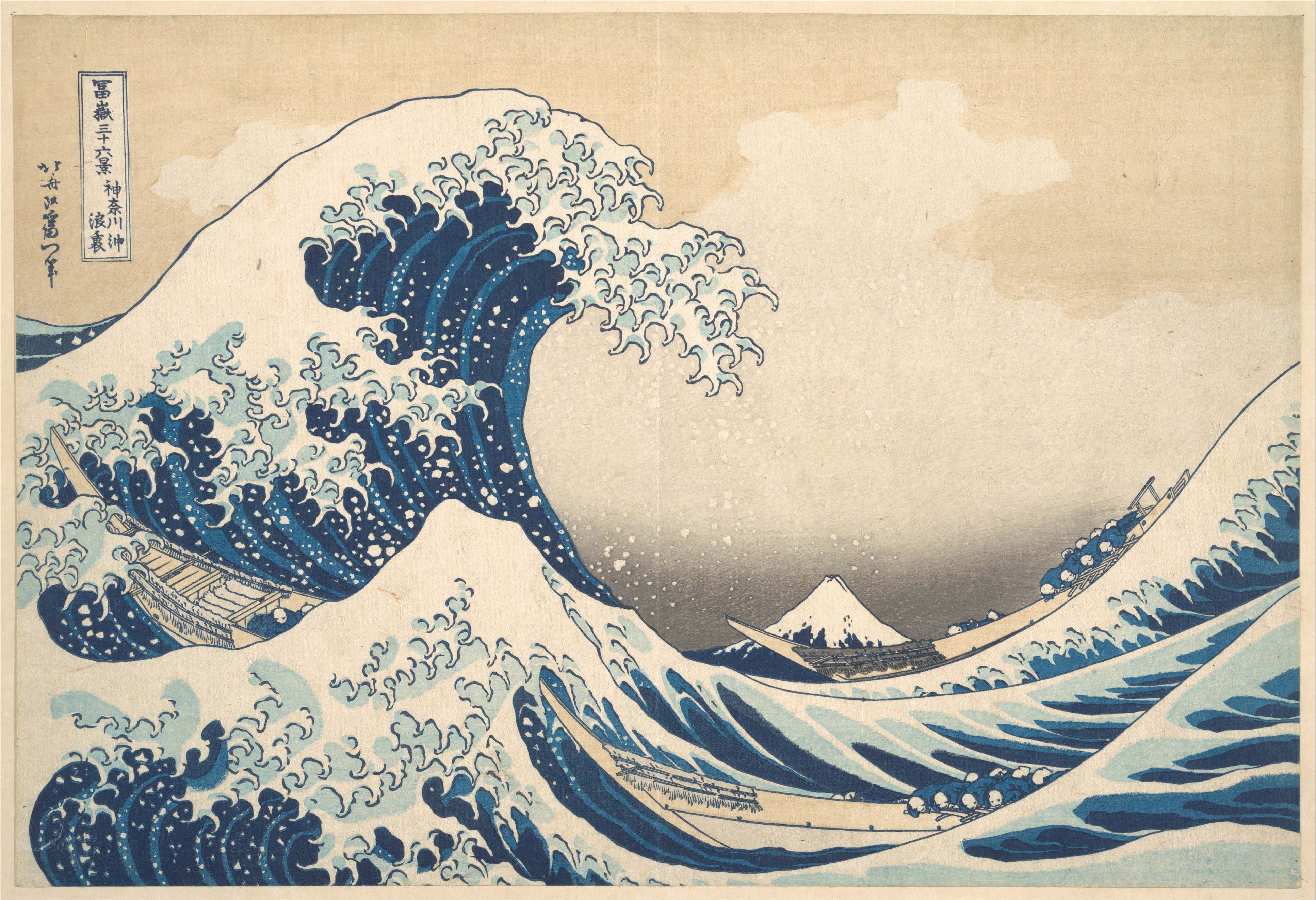
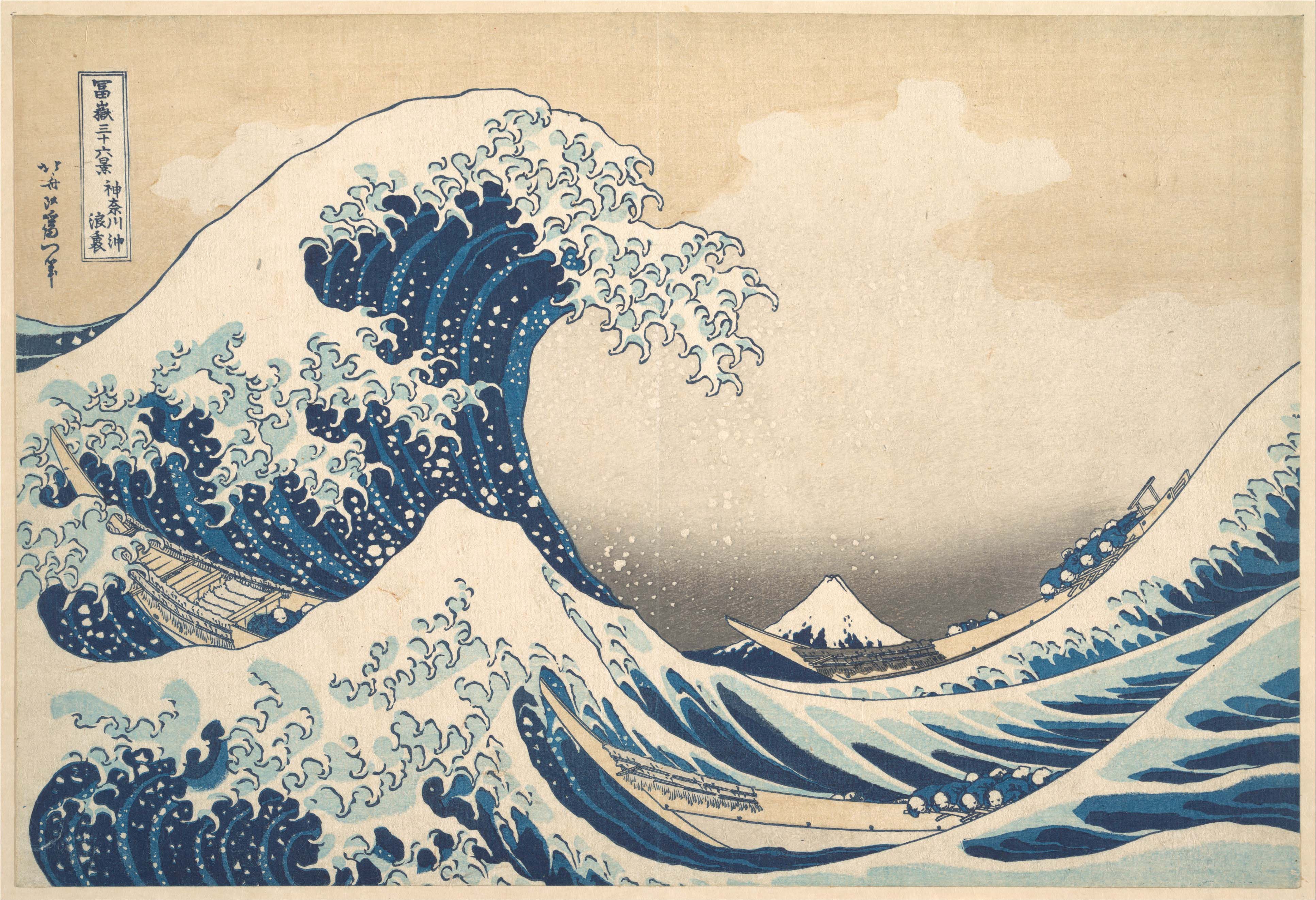
Katsushika Hokusai, Under the Wave off Kanagawa (The Great Wave), from Thirty-six Views of Mount Fuji, ca. 1830–32. The Metropolitan Museum of Art, New York, The Howard Mansfield Collection, Purchase, Rogers Fund, 1936 (JP2569). Public Domain; museum image released under CC0. Object record.
Pick the spot before the picture
A shelf beside your desk, a narrow entryway, the wall above a dresser: choose somewhere you’ll actually look. Decide whether a horizontal or vertical sheet would suit it. That small decision makes a sprawling online collection easier to browse.
Look at the image above. The wave is dramatic, but the pale sky takes up a surprising amount of space. You might choose it for the blue, or for the quieter color around it. Let that particular detail guide you rather than trying to find a picture that somehow represents your entire taste.
For alternatives, browse The Met’s Open Access collection. Try an artist or a subject such as “flowers” or “landscape.” Save three candidates, then keep the one you want to look at again tomorrow.
Save the museum’s image file
Open the object page for this Great Wave. Check the “Public Domain” label, then use “Download Image.” Save the object-page link alongside the file so you can find its details later.
The Met releases eligible collection images under its CC0 Open Access policy. This doesn’t cover every artwork or the museum’s website logos. If you choose another picture, check that specific image’s OA designation and terms.
We downloaded and inspected the official original JPEG: it measures 3,867 × 2,644 pixels. Use that file for printing, rather than a search thumbnail or a screenshot. For another image, check its width and height in your image viewer’s file-information panel.
Keep the whole picture and give it a border
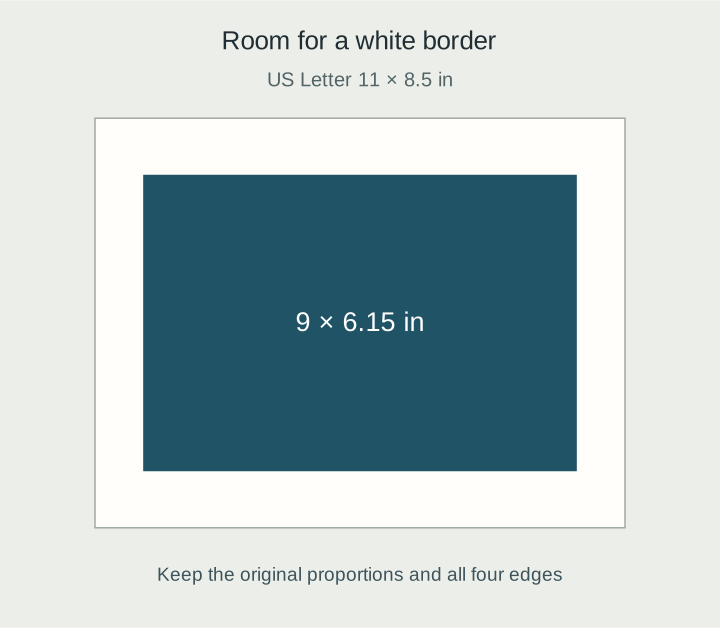
For a first full-size version, try US Letter paper in landscape orientation: 11 × 8.5 inches. At 9 inches wide, this image is about 6.15 inches high. Centering it leaves 1-inch side borders and roughly 1.17 inches above and below.
Expand the diagram
Scroll within the diagram horizontally; arrow keys work when focused.
White represents the paper; blue represents the full image. This is a calculated layout diagram, not a photograph of a finished print.
In a document or print app, select Letter, landscape, and lock the image’s aspect ratio before setting its width. Check the print preview for all four edges. Avoid “fill” or “crop to fit” settings that trim the picture, and check the final printed dimensions before sending it to the printer. Exact controls vary by app.
This file gives you about 430 pixels per inch at 9 inches wide: 3,867 divided by 9. That’s the useful relationship to remember. More inches from the same pixels means less detail per inch, as Adobe’s explanation of image size shows. Around 300 ppi is a common starting point for close-viewed prints, but changing a resolution field to “300” won’t restore detail missing from a small file. Judge the result on your paper, at the distance you’ll view it.
Already have an 8 × 10-inch frame? Turn it horizontally and use a 10 × 8-inch sheet or backing. The same 9-inch-wide image fits with a half-inch border on each side and about 0.92 inches above and below. A Letter sheet itself is too large for that frame. Check the frame’s actual visible opening, especially if it includes a mat.
Make the small print first
Before committing, print the image at about 6 inches wide. If you use a print shop, ask for the whole image with a white border and no cropping.
Look at the thin lines in the wave, the pale sky, and how the colors feel under your room’s lighting. The small print helps you choose; once you like it, check another copy at your intended display size before buying the frame.
A mat is the window-cut board inside a frame. It can give the image breathing room, but its opening may cover the edges. Leave a little white paper visible around the picture so the wave and lettering stay intact.
Start with that one print on a shelf. Living with it for a while is a useful way to discover what you want from the next one.
Sources and image notes
Sources checked October 8, 2026 (UTC), October 9 in Japan. The museum JPEG was downloaded and its pixel dimensions verified. No physical print or framing test was performed.
- The Met: artwork and image
- The Met: Open Access and image-use FAQ
- Creative Commons: CC0 1.0
- Adobe: image size, resolution, and resampling
The diagram was created for this article. The museum’s image file is reproduced unchanged; print dimensions were calculated from that file. This article is not an official museum publication.