Find the library edition you actually want to read
Your book group names a translation. The catalog returns a paperback, an older hardcover, an ebook, and an audiobook, all with the same title. Which one should you request?
Write down what has to match before choosing a copy. If you need a particular translator, keep that requirement while considering other bindings. If any reading edition will do, say so. The useful result is a short description of the book you want, followed by a separate check of how your library lets you use it.
Start with the requirement that matters
Imagine a reading group has assigned a particular translation of a novel. Your working note might be: “English translation by Translator R; print preferred; hardcover or paperback is fine.” That is much more useful than “the blue cover.”
Other reading purposes call for different notes:
- A revised reference work: copy the edition statement that matters to you.
- A large-print book: make that format a requirement, rather than an optional extra.
- An audiobook: check the language and any requirements you have about the narration or abridgment.
- A discussion that uses page numbers: ask the organizer whether a different binding or edition will work.
You do not have to become a collector of exact editions. Separate must match, can vary, and not yet known. If the only requirement is the work itself, do not accidentally rule out a perfectly useful copy because its cover looks different.
Read the record before the availability label
Start in your own public library's catalog. Search the title and author, then open the item's details. Look for the translator or editor, language, edition statement, volume, publisher, year, and format as needed. A bibliographic record describes the publication; the copy information tells you about the library's items.
Here is a fictional example created for this article. These are not actual catalog records or claims that either book exists.
| Detail | Candidate A | Candidate B |
|---|---|---|
| Work and author | The Quiet Crossing, Author Q | The Quiet Crossing, Author Q |
| Language and translator | English, Translator R | English, Translator S |
| Format | Print hardcover | Print paperback |
| Match to the note | Meets the translation requirement | Misses the translation requirement |
Candidate A can move to the access check. Candidate B being a convenient paperback does not fix the translation mismatch. If neither record gives the translator, mark that question unresolved instead of choosing by the year or thumbnail.
On WorldCat.org, an optional wider discovery service, the summary includes fields such as language, year, and format when available. OCLC's current documentation says the fuller bibliographic details require sign-in. You can continue with your local catalog or ask a librarian for help without creating a WorldCat account for this exercise. OCLC's bibliographic-data guide
Open the edition-matching diagram
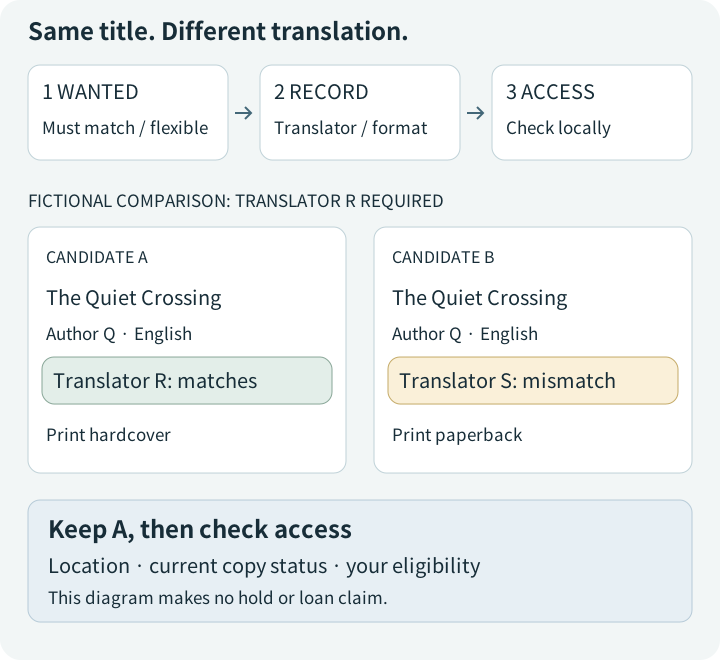
The diagram separates three decisions: wanted features, a matching record, and the local copy or access route. Its fictional book cards highlight Translator R versus Translator S. None of the cards has an availability claim.
Use an ISBN as a search key, then check the details
If a publisher's page or reliable record supplies an ISBN, add it to your note and use it to narrow the search. Keep the original record link too. If an ISBN is absent, the title, author, publisher, year, and other identifying information still give you a route forward.
Different language editions and formats require different ISBNs. A substantially revised text also requires a new one; an unchanged reprint retains its ISBN when the publisher, text, and binding remain the same. A later printing therefore does not automatically mean a revised reading edition. International ISBN Agency's assignment guidance
After an ISBN search, still inspect the features you marked essential. OCLC notes that a record can carry multiple ISBNs. Finding a number in a record is a reason to examine it, rather than to ignore a conflicting format description. OCLC's record-field explanation
Do not fill a missing ISBN with a number from another format just to complete the note. An honest blank is more useful than a confident mismatch.
A long library list is not an edition-specific promise
WorldCat can help widen a search, but its “Find a Copy at a Library” count covers holdings across editions. OCLC also says that filtering those results by format, edition, or distance currently requires sign-in. A large number beside a title does not establish that your chosen translation is waiting at a nearby branch. OCLC's item-details guide
Once you have a promising library, open its own catalog and compare the required features again. Then look separately at the location, current copy status, borrowing or in-library-use conditions, and whether you are eligible for the service. For an ebook, check that library's access requirements rather than treating its listing as access through any library card.
If the requested edition is unclear, ask before placing a hold. If you cannot find it locally, ask your library whether an acceptable alternative or an interlibrary-loan route is possible. The answer depends on that library and the material; this is a question to investigate, not a delivery promise.
Leave yourself a note you can actually use
A compact record is enough. Copy only the fields needed for this reading purpose:
- Title and author; translator or editor; volume if relevant
- Language, edition statement, and required format
- Publisher, year, ISBN if present, and a record link
- Must match: ____. Can vary: ____. Still unknown: ____
- Local library and date checked; copy or access status; next question
For the fictional example, your question could be: “I'm looking for The Quiet Crossing by Author Q in Translator R's English translation. Either print binding would work. Can you help me find a copy I can use?” Attach or show the record link so the person helping you can see the same candidate.
There are three good stopping points. You have matched a local item and can follow its request instructions; you have a mismatch and can try an acceptable alternative; or you have one precise question for a librarian. Each moves the search forward. Finding “the same title” is only the beginning; knowing which differences matter makes the next choice much easier.
Sources and scope
Official International ISBN Agency and OCLC documentation was checked on October 10, 2026 (UTC). The comparison records, notes, and diagram are original fictional teaching examples. No real-title holdings lookup, account sign-in, hold, loan, or browser-display test was performed. Recheck current catalog guidance and your library's service conditions when using them.