US buying guide · Checked October 11, 2026 · About 7 minutes
MacBook Air vs Pro vs Mac mini vs iPad: which should you buy or keep?
Start with a MacBook Air if you need one portable computer for work or school. Look at a MacBook Pro when demanding production work regularly holds you up. Choose a Mac mini if you already have a desk setup. Start with an iPad Air for drawing, handwriting and marking up documents. An iPad Pro makes most sense when its display matters to you. If your M1 or M2 device already does the job comfortably, keeping it is a reasonable choice.
Before comparing chip names, decide which apps you need, where you will work and whether you want to write directly on the screen. An M-series chip does not make an iPad run the same software as a Mac.
Pick the type of device first
Scroll the table horizontally; arrow keys work when focused.
Your main job
Start here
Check before buying
Papers, presentations and calls, at home and on campus or the road
MacBook Air
Required software supports macOS
Frequent demanding video, 3D or development work
MacBook Pro
The actual chip and memory configuration
Work at a desk with a monitor and input devices you already own
Mac mini
Whether you also need a portable computer
Handwritten notes, PDF annotation and illustration
iPad Air
App workflow and Pencil cost
Pen-based work with an OLED, high-refresh-rate display
iPad Pro
Whether the screen justifies the premium
Reading, streaming, browsing and light note-taking
iPad with A16
Pencil compatibility and any missing app features
These are recommendations based on published specifications, not hands-on speed, battery or drawing tests.
On a tighter laptop budget, also consider MacBook Neo, currently from $699. Its A18 Pro, 8GB memory and 256GB starting SSD may fit a browser-and-documents workload. The trade-offs include 8GB memory and support for one external display up to 4K at 60Hz. Air is not Apple's cheapest laptop. Current Mac prices, Neo specifications.
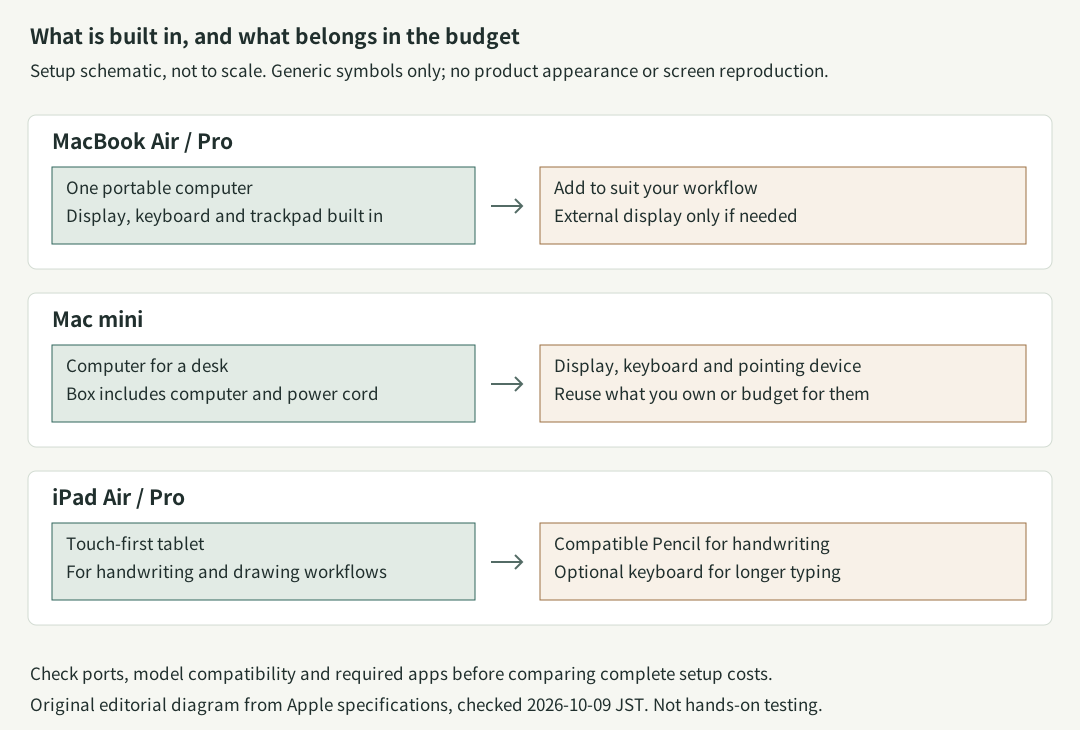
Scroll horizontally if the diagram does not fit. Setup schematic: MacBook integrates its display and input devices; Mac mini needs a separate display and input devices; iPad Air/Pro needs a compatible Pencil for handwriting. Not to scale or a reproduction of product appearance. · Original editorial illustrationExpand the diagram
Scroll within the diagram horizontally; arrow keys work when focused.
iPadOS 26 and later supports resizable windows, side-by-side apps and a menu bar. Supported Air and Pro models can move app windows onto an external display. Apple's windowing guide, external-display workflow.
Instead, test whether your required features, file exchanges and accessories work:
Xcode development: choose a Mac. Xcode is a Mac application; buying an M5 iPad Pro does not let you run it locally. Xcode requirements.
Procreate illustration: choose a supported iPad. The app does not require an iPad Pro; check your intended canvas and layer requirements. Developer FAQ.
Final Cut Pro editing: both platforms have a version. Workflows involving Motion or Compressor need a Mac. The iPad version can work with external-SSD projects in supported configurations, so external storage alone does not rule it out. Apple's product FAQ, iPad project-storage guide.
For a college major or employer with required software, check the department's or IT team's requirements first. A Windows-only requirement may put every device in this comparison outside the right shortlist.
How the three Macs differ
Air for carrying and everyday work
The current M5 MacBook Air comes in 13- and 15-inch sizes. The 13-inch weighs 2.7 pounds; the 15-inch weighs 3.3 pounds. Both are fanless. Pick the smaller model for carrying around; consider the larger one if you want more workspace without moving up to Pro. Air specifications, fanless design.
Keep Air on the shortlist for occasional photo and video work. Consider Pro's higher-end chips and memory when long exports, large builds or complex 3D scenes regularly delay your work.
Pro for the display and ports as well as demanding work
MacBook Pro offers 14- and 16-inch displays, Liquid Retina XDR with ProMotion up to 120Hz, HDMI and an SDXC card slot. Those can matter independently of processing speed. Pro specifications.
Be careful with the names: the entry 14-inch MacBook Pro has M5, while M5 Pro and M5 Max are other chip configurations. An Air-to-Pro price difference also buys a different display, ports and starting storage. It is not a direct measure of extra speed.
mini for a desk you want to keep
The current Mac mini uses M6 or M5 Pro. Apple announced September 22, 2026 availability; the October 11 store check lists configurations for purchase. M4 is the previous generation. Only the computer and power cord are included, so budget for any missing monitor, input devices, webcam and cables. Dated announcement, mini specifications.
If multiple monitors are important, here are the limits before resolution and refresh-rate conditions are applied:
Scroll the table horizontally; arrow keys work when focused.
Current device
Maximum external displays
MacBook Air M5
Two, alongside its built-in screen
MacBook Pro
M5: two; M5 Pro: three; M5 Max: four
Mac mini M6 or M5 Pro
Three
iPad Air M4 or iPad Pro M5
One, with supported extended-window workflows
Check the exact display combination and cables. iPad Air supports up to 6K at 60Hz; iPad Pro supports up to 6K at 60Hz or 5K at 120Hz. Air, Pro, mini, iPad Air, iPad Pro.
Within iPad, start with Air
Current iPad Air uses M4; iPad Pro uses M5. Both have 11- and 13-inch options and support Apple Pencil Pro. Pro's clearest upgrade is its tandem OLED display and adaptive 10–120Hz ProMotion. Air has an LCD without ProMotion. Try the scrolling and pen feel before deciding the screen is worth the difference. For demanding artwork, also check memory and the app's limits. Air specifications, Pro specifications.
The $449 iPad with A16 still deserves consideration for reading, streaming and lighter notes. It supports Apple Pencil USB-C and first-generation Pencil, not Pencil Pro. Its external video output is not the same extended workspace offered by supported Air and Pro models. US iPad prices, A16 specifications, extended-display compatibility.
Compare complete setups
These are regular US Apple Store prices rechecked October 11, 2026, before sales tax, excluding education discounts, trade-ins, financing and promotions. They use the checked store listing, rather than launch prices.
Scroll the table horizontally; arrow keys work when focused.
Match the Macs at 16GB memory and 512GB storage: M6 mini costs $1,099, versus $1,299 for 13-inch M5 Air. That leaves $200 for the mini's peripherals before its hardware total reaches the Air's. Reusing a good monitor, keyboard and mouse makes a real difference. mini configuration, Air configuration.
If you budget $300 for the desk accessories you need, the mini setup becomes $1,399 before tax. That is $100 above the Air. This is a budgeting example, not a quote for a particular monitor bundle. A larger desktop screen may be worth the money; just do not assume a bare mini is the cheaper complete computer.
An iPad keyboard setup can reach laptop money
At 11 inches, Wi-Fi and 256GB on both tablets, add the matching Apple Magic Keyboard and Apple Pencil Pro:
Scroll the table horizontally; arrow keys work when focused.
That Air bundle is close to MacBook Air pricing, but has half the storage. Choose a 512GB iPad Air at $1,049, and the bundle becomes $1,447, or $148 more than the 512GB MacBook Air. Direct pen input may make it the right purchase anyway. If you do not need a keyboard, leave it out. iPad Air configurations.
These hardware totals exclude apps, cloud storage, cellular service, extra cases and optional coverage. Include the iPad keyboard and case when comparing travel weight.
Already own an older model?
Keeping a device assumes it still supports your required apps and OS, works properly and has adequate battery life. No future support-end date is promised here.
Scroll the table horizontally; arrow keys work when focused.
What you own
What a newer model changes
A reason to keep it
MacBook Air M1
M5 brings a larger, brighter screen, 12MP Center Stage and two external displays; M1 has a 720p camera and one external display
Documents and browsing remain comfortable; battery and ports meet your needs
MacBook Air M2
M2 already has the 13.6-inch screen, 1080p camera and MagSafe; M5 adds benefits such as two external displays
One monitor is enough and memory or processing waits are not a problem
Mac mini M4
New chip and connectivity on M6; M4 already starts at 16GB and supports three displays
Your existing desk workflow runs well
iPad Air M1
M4 offers Pencil Pro, landscape camera placement and 128GB starting storage; the old second-generation Pencil cannot move with you
Your current Pencil, storage and note-taking setup work
iPad Air M2
It already supports Pencil Pro and has the landscape camera; M4 increases memory from 8GB to 12GB
Drawing and other work already feel responsive
iPad Pro M4
M5 increases base memory and adds other capabilities; M4 already has OLED, ProMotion and Pencil Pro
You are satisfied with the screen and project performance
M1 and M2 iPad Air also support an extended external workspace with compatible software. Check what an OS or app update adds before buying new hardware to obtain a feature you can already use. Supported models.
Used and refurbished need a different checklist
A discounted M2 Air, M4 mini or M4 iPad Pro can be sensible if capacity, condition and warranty make the savings worthwhile. Compare a current listing rather than treating a historical used price as today's deal. A cheap 8GB Mac and a new 16GB Mac are different configurations.
Apple Certified Refurbished includes a one-year limited warranty. Apple promises a new battery and outer shell for refurbished iOS devices; that is not a promise that every refurbished Mac gets a new battery. A third-party seller's “refurbished” label may carry different terms. Apple's refurbishment policy.
Check memory, storage, battery condition, keyboard layout, returns, warranty and included accessories. Make sure the previous owner's Activation Lock is removed. iPad guidance, Mac guidance.
Buy to solve a specific problem
Choose Air for portable work, Pro for demanding production, mini for a desk setup, and iPad for touch and Pencil. If none fixes a problem you can name, keep what you have.
Checked October 11, 2026. Recheck prices, configurations and app support before buying. This guide focuses on MacBook Air/Pro, Mac mini and iPad Air/Pro; iMac, Mac Studio and iPad mini are outside the detailed comparison.