Technology · English (US)
USB-C connection guide · About 5 minutes · Sources checked October 9, 2026 (Japan Standard Time)
Technology · English (US)
If your seat is still a mystery and this is your first pair, start with 8x for easier handheld viewing and following the action. Put 10x on your shortlist if seeing one performer larger matters most and you can hold the image comfortably steady. Wear glasses? Check the fit at your eyes before choosing either magnification.
Technology · English (US)
First record the apparent UI workspace separately from the monitor’s input resolution and refresh rate, then compare one monitor connected directly to your Mac. A working picture does not establish that the whole connection supports 3840 × 2160 at 120Hz. If there is no picture at all, start with the archive’s separate “USB-C charges your laptop but the monitor stays blank” guide.
Technology · English (US)
An M1 or M2 Air supports one external display through its native video output. An M3 Air can use two with its lid closed. M4 and M5 Air models can use two while keeping the laptop screen on. Check your chip before buying a dock. Two HDMI sockets do not establish support for two independent workspaces.
Technology · English (US)
Start with your Mac’s exact model and the charger you already own. Enough power for your work and support for fast charging are separate checks. If the existing setup meets your needs, a higher number on a new charger is not a reason to replace it.
Technology · English
Try the same file with the SSD connected directly to your computer, using its supplied cable. If that helps, add your original hub and cable back one at a time. The useful result is knowing which connection changes the wait, so you can decide whether anything needs replacing.
Technology · English
Start by finding an external drive you can dedicate to backups. A compatible hard drive or SSD you already own may be enough to begin. The useful milestone is a completed first backup followed by opening one restored practice file.
Technology · English
Before buying another storage upgrade, open Settings → General → iPhone Storage and look at what is taking up space. A larger iCloud plan does not increase your iPhone’s built-in capacity. Photos and apps need different next steps. Apple’s explanation of the two storage types
Technology · English
Pac-Man can wait for an answer. The ghosts keep moving.
Technology · English
If your monitor shows the same picture as your iPad, check the iPad model first. A USB-C port does not automatically mean you can put a different app on each screen. Supported models can extend the workspace; then the connection, input devices, and window settings are the next things to check.
Technology · English (US)
A return label here, a form there, then nothing for weeks. A cheap printer looks tempting when the alternative is another trip to a store.
Technology · English
A calculator returns 960 for a price of 1,200 with 20% off. That looks right. Now try a price of 101 with 50% off. Depending on what gets rounded first, two plausible implementations return different answers.
Technology · English
Switching from a video call to a document should not interrupt your train of thought. If it keeps doing so on your M1 or M2 Mac, start by opening Activity Monitor → Memory while the slowdown is happening. The useful question is whether your everyday workload is putting memory under pressure, and what changes when you remove something you do not need.
Technology · English
Use APFS for a Mac-only SSD and consider exFAT for ordinary files you move between a Mac and a Windows PC. If the drive already does what you need, keeping its current format may be the best decision. Time Machine backups and an Apple Photos library have their own requirements, so check those before changing anything.
Technology · English
Start with three requirements: your displays, your SSD workload, and the power your laptop needs. A USB4 or Thunderbolt 4 setup that meets all three belongs on your shortlist. Thunderbolt 5 becomes a stronger choice when you have compatible equipment and a specific use for its extra bandwidth.
Technology · English (US)
If extra charging is your only real complaint, get a battery-replacement estimate before shopping for another iPhone. The useful question is simple: would you still enjoy using this phone if its battery were in better shape?
Technology · English
Start with unlocking the phone and checking Files, then the connection, power, and drive format. Change one thing at a time so you can identify what helped. If the SSD holds the only copy of important photos or documents, stop before any erase or reformat operation.
Technology · English (US)
You may be able to keep your Apple Pencil when you buy another iPad. Identify the Pencil you own, match it to the exact destination iPad, then budget for anything missing. Some supported combinations need an adapter. Others use a cable even though the Pencil attaches magnetically. Checking these details before checkout can prevent an unnecessary replacement or an incompatible purchase.
Technology · English (US)
You may be able to keep most of your desk setup when you switch to a Mac mini. Check the display, input devices, call equipment, and first-day setup before adding accessories to your budget. The useful shopping list starts with the equipment you own and ends with specific gaps. It does not need to become a complete desk replacement.
Technology · English (US)
A chatbot gives you a date, a document title, and an explanation that seems to tie everything together. Then the document turns out not to exist. The unsettling part is that the wrong answer sounds just as polished as the useful ones.
Technology · English (US)
Your iPhone shows the photo, but your PC shows an unhelpful file icon. Start by copying the HEIC file and opening that copy in Microsoft Photos. Adding the support your PC needs may let you view it without converting it to JPEG. If a website needs a JPEG, make a separate copy for that job and keep the original.
Technology · English (US)
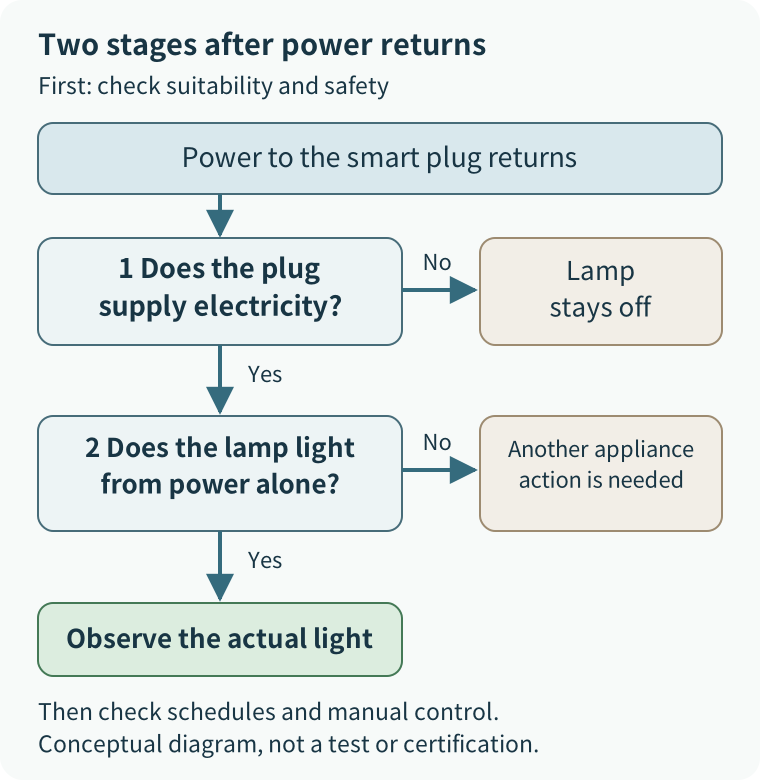
Choose one lamp and one control app, then check what you already own. A separate hub may be unnecessary. If the current remote works well, keeping it is a good outcome. This guide covers suitable plug-in lighting and replaceable bulbs in a US home, including a rented room, without changing in-wall wiring.
Technology · English (US)
If you already own compatible AirPods and an Apple Intelligence-capable iPhone, check the setup before shopping. AirPods Pro 2 qualify. A standard iPhone 15 does not, and neither do AirPods 4 without Active Noise Cancellation.
Technology · English
A diffusion model learns how to move noisy data toward images, then uses that learning to make new pictures. Training adds noise to known examples; generation starts from a random state and repeatedly applies a trained model. The finished picture is not already hiding inside the static. Separating those two stages is the useful first step.
Technology · English (US)
Extra AI computation can produce more candidates, explore intermediate choices, and evaluate or revise an answer. Use reasoning when known constraints need combining, retrieval when facts are missing, and verification when the result needs checking. Waiting longer, or receiving a longer answer, does not tell you which of those jobs happened.
Technology · English (US)
A 10,000 mAh power bank and a 4,000 mAh phone look like an easy division: two and a half charges. For a useful estimate, compare their energy in watt-hours, then account for losses along the charging path. When choosing a bank, check stored energy, compatible power output, and the weight you will actually carry.
Technology · English
An earlier detail can be absent from the material used for the next answer, or present but poorly used. A long conversation and a memory feature do not guarantee that every requirement will carry through. The practical repair is to restore the relevant evidence, agree on a short current brief, and check the result against it. Start by separating what the chat displays, what the model receives, and what the answer actually follows.
Technology · English
A text embedding represents a sentence or passage as a list of numbers. A search system can compare those lists to find related meanings, even when the wording differs. Describe the idea when you want candidates; preserve exact names, model numbers, and other hard conditions when you need a particular item. A close match is a reason to look, not proof that the result means exactly the same thing.
Technology · English (US)
Consider an NPU when a feature you want specifically supports or requires it. Keep a satisfactory PC for cloud AI, investigate compatible hardware for frequent on-device features, and postpone an AI-driven upgrade if the use is still vague. An “AI PC” label or a large TOPS figure cannot tell you which features you will use or how well they will work.
Technology · English
A document can contain text that tries to redirect an AI away from your request. The document should supply information for the task; it should not gain permission to change your goal or take an outside action. This problem is called prompt injection, and it can affect an answer before any file is sent or purchase is made. Keep the task specific, limit unnecessary access, and inspect the details of consequential actions before approving them.
Technology · English
AI can consult a document while answering without retraining its underlying model. The useful question is which passage reached the answer, and whether it supports the decision you need to make. A search step can bring a newly issued rule into the conversation, even when it was absent from the model's training. Start with the document's identity, date, and scope before judging how convincing the answer sounds.
Technology · English
Robots can increasingly connect visual information and spoken instructions to useful actions. A successful demonstration still does not establish that you can hand over your household chores. The intriguing advance is the loop: see what happened, adjust the next action, and sometimes ask for help. Start by separating an AI model, a demonstration system, and a supported household product.
Technology · English (US)
Start with iPhone 17 for everyday use, choose 18 Pro for a specific camera or creative need, and consider Duo if you regularly want two apps open side by side. The 17e is the lower-cost choice for the basics. If your current 17 or 17 Pro still does what you need, keeping it is a sensible answer too.
Technology · English (US)
If your books are on Kindle and you have specific comics or illustrated books you want to read in color, put the new Colorsoft on your shortlist. If built-in page-turn buttons matter more and your next books are available through Kobo, start with the Libra Colour. If you mostly read novels and black-and-white manga, keeping a working monochrome reader may be the most satisfying use of your money.
Technology · English (US)
Start with a MacBook Air if you need one portable computer for work or school. Look at a MacBook Pro when demanding production work regularly holds you up. Choose a Mac mini if you already have a desk setup. Start with an iPad Air for drawing, handwriting and marking up documents. An iPad Pro makes most sense when its display matters to you. If your M1 or M2 device already does the job comfortably, keeping it is a reasonable choice.
Technology · English (US)
Check the off rule and its delay first. If the room still goes dark while you read, consider sensing designed for smaller movements. A more expensive sensor alone will not necessarily end the ritual of waving at your lights. A hallway you walk through and a room you sit in need different definitions of “finished.”
Technology · English (US)
Yes, if your mini-split or window AC uses a supported infrared remote, a separate controller can add phone control. Instead of arriving home and then starting the cooling, you can send the command before you arrive. The tradeoff is another powered device, network dependence, and settings that can drift out of sync with the original remote.
Technology · English
Clear sound does not always reveal the correct spelling. Speech recognition uses learned relationships between audio and text, while names and ambiguous words may need context that the recording never supplies. Start by checking the original audio, then the intended spelling or terminology, before turning the transcript into a summary. If an important detail remains uncertain, keep it uncertain rather than polishing it into a confident statement.
Technology · English (US)
Tall buildings can block or reflect satellite signals, making a phone’s position estimate less reliable. Stop somewhere safe and compare the map with street signs and visible landmarks before choosing your next turn. Do not follow a jumping dot into the road or through a restricted entrance.
Technology · English
Hearing other people confirms that audio reaches your speakers. Your microphone follows a different path, with its own device selection, mute controls, and permissions. Check the physical mute and the call's selected microphone first, then compare the computer's input test with the app's microphone meter. Change one thing at a time, and finish by asking another participant whether your voice is clear.
Technology · English (US)
Put the first sensor where escaping water can reach its sensing contacts and where you can retrieve it for maintenance. “Under the sink” is a starting location, not a promise that the whole cabinet is monitored. A lip, shelf, or storage bin can keep water away from the detector.
Technology · English (US)
Try 5 GHz for demanding tasks near the router, and consider 2.4 GHz when walls or distance make a connection unreliable. A device that supports only 2.4 GHz needs that band. If your current connection works well, there is nothing to fix.